Tiles R Us

How to Install Tiles

We highly recommend the use of a basic grout such as Tec AccuColor, plus a grout admix such as Grout Boost Advanced Pro or Tile Doctor Grout Admix rather than a sealer. Firstly, admixes are mixed into the grout itself, so applying them couldn’t be easier. Secondly, admixes never wear off: as the grout wears down, more admix gets exposed. Thirdly, with with these products, grout becomes physically incapable of supporting mold and mildew growth.

Brasilia Wall Ceramic Tile

Use Tile Doctor Grout Admix for showers and Grout Boost Advanced Pro for floors. The Advanced Pro formulation of Grout Boost is highly stain-resistant, even protecting against oils, coffee, and pet messes. Tile Doctor Grout Admix holds up better to constant water submersion.

Tec AccuColor is a great grout to use because it comes in 32 different colors to match any decor. There are even 32 matching colors of siliconized caulk and 20 matching colors of silicone sealant. Tec also makes the best thinset mortars.

ON floors

If this project is a wall & floor installation, always start with the floor.

Step 1: Repair and Smooth Damaged Concrete
Install Tiles

On bad concrete, smooth with concrete filler, or similar compound.

Install Tiles

On old concrete, clean & remove old dirt. A degreaser is recommended.

Install Tiles

On vinyl floor, remove vinyl flooring and adhesives.

Install Tiles

On wood floor, install concrete board tape joints with fiber glass tape, & thinset joints.

Install Tiles

On old ceramic tile, clean with degreaser and test a small area overnight for bonding.

Install Tiles

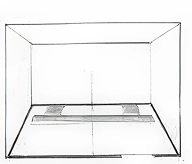
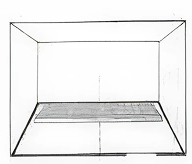
Draw center lines and mark them with a chalk line and a straight edge.

Install Tiles

Lay out a few tiles to visualize the layout.

Install Tiles

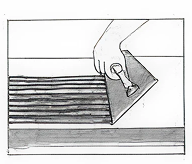
 Spread your thinset with appropriate trowel at an angle of 45 degrees. For mixing instructions, refer to adhesive manufacturer.

Install Tiles

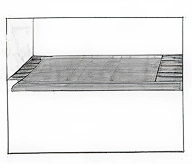
Install the the ceramic tile against the straight edge and center line.

Install Tiles

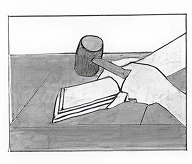
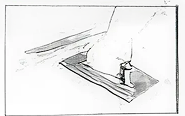
Lay a beating block on the tile, and with a mallet, pound gently to smooth the surface to achieve better bond.

Install Tiles

Move the straight edge to the next section of installation. Repeat steps 8-11.

ON walls

Step 12: Remove Wallpaper and Adhesive Residue
Install Tiles

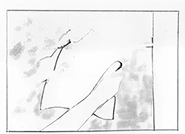
Remove wallpaper and remove all traces of adhesives.

Install Tiles

Remove loose paint and scratch good surfaces for better bonding.

Install Tiles

 Patch wall and smooth  walls with appropriate compounds.

Install Tiles

Clean & wash old walls with degreaser cleaner.

Install Tiles

Smooth rough surfaces by sanding or scraping.

Install Tiles

If installing over old ceramic, scratch the glazed surface.

Install Tiles

Draw your vertical line using bubble level or tile setter’s lead.

Install Tiles

Draw your horizontal line using a bubble level.

Install Tiles

Spread adhesive at 45 degrees following manufacturer instructions.

Install Tiles

Apply ceramic tile starting at the center to the side walls. 

Install Tiles

Proceed to cut the side walls with nippers or a good tile cutter.

Install Tiles

Cut the bottom as much as required.

Install Tiles

Clean the tile 24-36 hours after installation.

Install Tiles

Spread grout using a grout  float.

Install Tiles

With the grout float, pack grout into the joints.

Install Tiles

Remove excess grout with the grout float. 

Install Tiles

Let it dry for 10-20 min.

Install Tiles

Rub along the joints with a wet sponge.

Install Tiles

Polish tiles with a clean cloth.

Let’s Find the Perfect Surface to Define Your Style

Reach out for quotes, samples, or shipping updates